領収書テンプレート
A5 横の
- 見本の
会社名・氏名・住所・金額は 架空の ものです。
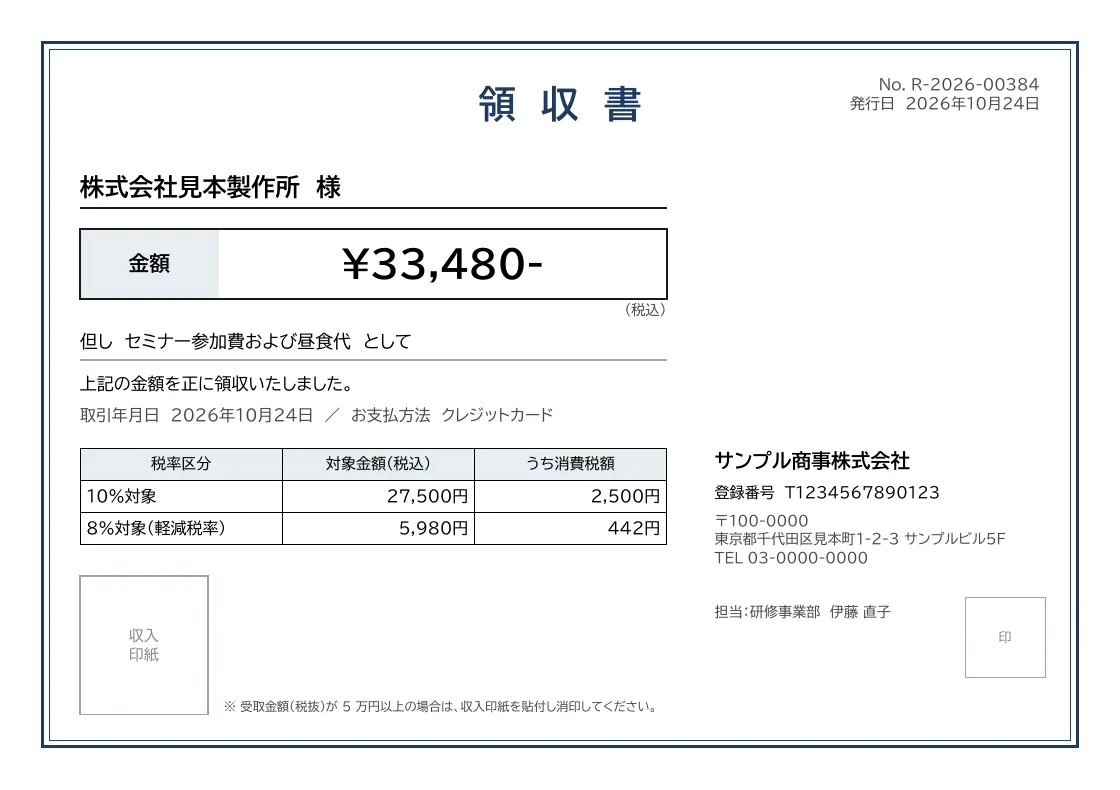
主な用途
- 店頭・窓口での
代金の 受領 - EC サイトでの
購入者向けの 領収書の ダウンロード - イベント・セミナーの
参加費の 領収
差し込み項目
API で配列名.項目名 の
| 項目 | 内容 |
|---|---|
number | 領収書番号 |
issued_at | 発行日 |
customer.name | 宛名 |
total | 金額 |
description | 但し |
transaction_date | 取引年月日 |
payment_method | お支払方法 |
tax.rate10.total | 10% 対象の |
tax.rate10.tax | 10% 対象の |
tax.rate8.total | 8% 対象の |
tax.rate8.tax | 8% 対象の |
issuer.name | 発行者の |
issuer.registration_number | 発行者の |
issuer.postal_code | 発行者の |
issuer.address | 発行者の |
issuer.tel | 発行者の |
issuer.contact | 担当者名 |
使い方
- 管理画面の
[テンプレートを 作成]で、 作成方法に 「ひな型から 作成」 を 選び、 「領収書」 を 選択します。 レイアウトと サンプルデータが プロジェクトに 複製されます。 - テンプレートエディターで、
社名・ロゴ・項目の 配置などを 自社の 書式に 合わせて 編集します。 - API の
POST /v1/rendersにテンプレート名と データを 送信すると、 PDF を 発行します。
テスト環境のsk_test_)create_template のfrom に
API での作成と発行
POST /v1/templates のfrom にreceipt)POST /v1/renders に
1. ひな型からテンプレートを作成
curl https://api.docrelay.jp/v1/templates \
  -H "Authorization: Bearer $DOCRELAY_API_KEY" \
  -H "Content-Type: application/json" \
  -d '{ "name": "領収書", "from": "receipt" }'
2. データを送信して PDF を発行
curl https://api.docrelay.jp/v1/renders \
  -H "Authorization: Bearer $DOCRELAY_API_KEY" \
  -H "Content-Type: application/json" \
  -d @receipt.json \
-o receipt.pdfreceipt.json(サンプルデータ。配列は先頭の 1 件、長い文は省略)
{
  "template": "領収書",
  "format": "pdf",
  "data": {
    "number": "R-2026-00384",
    "issued_at": "2026-10-24",
    "customer": {
      "name": "株式会社見本製作所"
    },
    "total": 33480,
    "description": "セミナー参加費および昼食代",
    "transaction_date": "2026-10-24",
    "payment_method": "クレジットカード",
    "tax": {
      "rate10": {
        "total": 27500,
        "tax": 2500
      },
      "rate8": {
        "total": 5980,
        "tax": 442
      }
    },
    "issuer": {
      "name": "サンプル商事株式会社",
      "registration_number": "T1234567890123",
      "postal_code": "100-0000",
      "address": "東京都千代田区見本町1-2-3 サンプルビル5F",
      "tel": "03-0000-0000",
      "contact": "研修事業部 伊藤 直子"
    }
  }
}