Invoice template
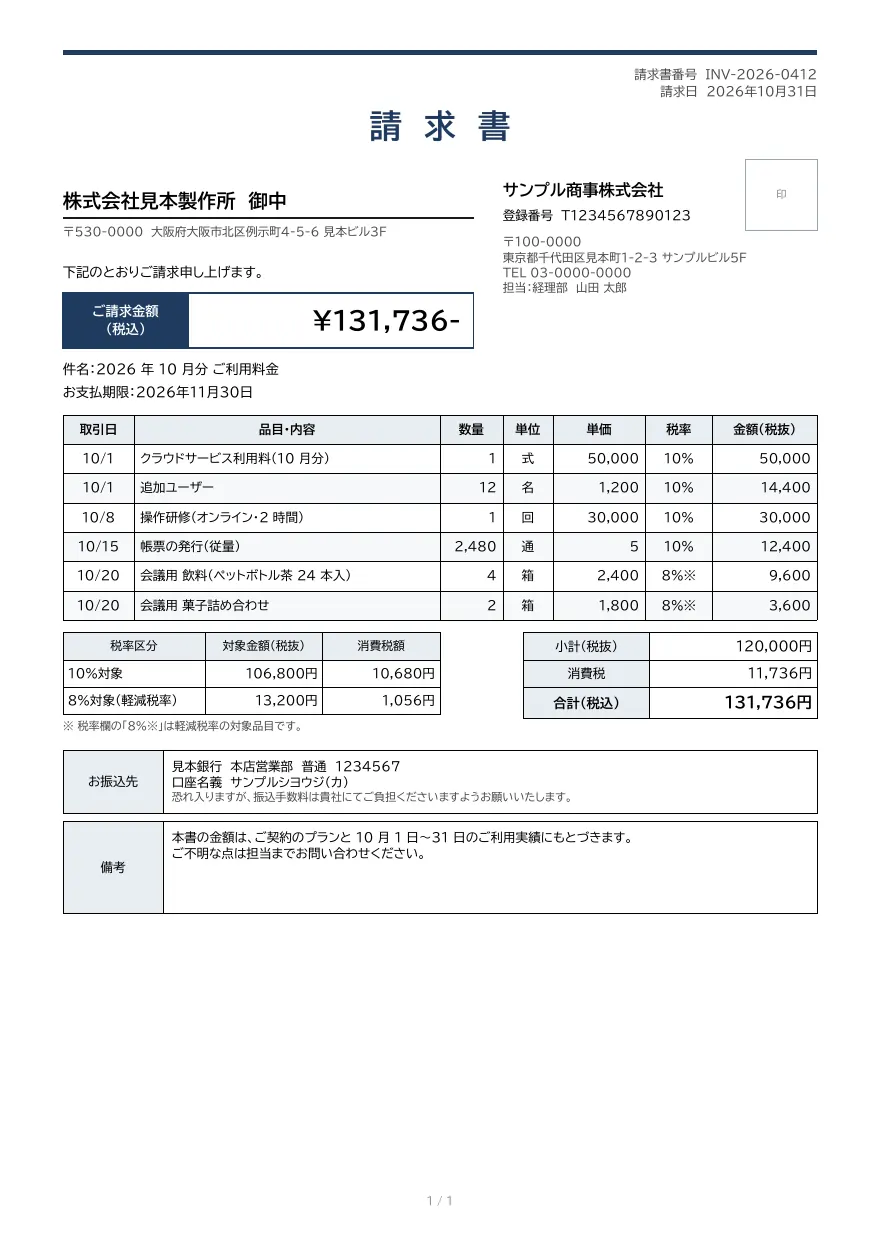
An invoice with dated line items and tax rates, totals and consumption tax by rate, and bank details. A layout example that includes fields for the items required on a qualified invoice in Japan.
- Company names, people, addresses and amounts in the sample are fictional.
- The sample layout is in Japanese. You can change any text in the template editor.
Use cases
- Monthly subscription and maintenance billing
- Bulk invoice issuance from sales or ERP systems
- Sending PDF invoices by email
Merge fields
The data fields you send to the API. Fields inside an array are shown as array.field.
| Field | Description |
|---|---|
number | Invoice number |
issued_at | Issue date (YYYY-MM-DD) |
customer.name | Customer name (recipient) |
customer.postal_code | Customer postal code |
customer.address | Customer address |
total | Total amount including tax |
subject | Subject |
due_date | Payment due date (YYYY-MM-DD) |
issuer.name | Issuer name |
issuer.registration_number | Issuer registration number (T + 13 digits) |
issuer.postal_code | Issuer postal code |
issuer.address | Issuer address |
issuer.tel | Issuer phone number |
issuer.contact | Contact person |
items | Line items (array) |
items.date | Transaction date |
items.name | Item or description |
items.qty | Quantity |
items.unit | Unit |
items.price | Unit price excluding tax |
items.tax_rate | Tax rate (e.g. 10%, 8%※) |
items.amount | Amount excluding tax |
tax.rate10.base | Amount subject to 10% (excluding tax) |
tax.rate10.tax | Consumption tax at 10% |
tax.rate8.base | Amount subject to 8% (excluding tax) |
tax.rate8.tax | Consumption tax at 8% |
subtotal | Subtotal excluding tax |
tax_total | Total consumption tax |
bank.name | Bank name |
bank.branch | Branch |
bank.type | Account type |
bank.number | Account number |
bank.holder | Account holder |
note | Notes |
How to use it
- In the dashboard, choose Create template, select "Start from a template" and pick "Invoice". The layout and sample data are copied into your project.
- Edit the company name, logo and field positions in the template editor to match your own format.
- Send the template name and data to
POST /v1/rendersto issue a PDF.
With a test API key (sk_test_) you can issue documents from the draft. Publish a version before issuing with a production API key. From an AI assistant, specify the same template in the from of the MCP create_template tool.
Create and issue via the API
Create a template by setting from to the template ID (invoice) in POST /v1/templates, then send the template name and data to POST /v1/renders.
1. Create a template from the ready-made one
curl https://api.docrelay.jp/v1/templates \
  -H "Authorization: Bearer $DOCRELAY_API_KEY" \
  -H "Content-Type: application/json" \
  -d '{ "name": "Invoice", "from": "invoice" }'
2. Send data and issue a PDF
curl https://api.docrelay.jp/v1/renders \
  -H "Authorization: Bearer $DOCRELAY_API_KEY" \
  -H "Content-Type: application/json" \
  -d @invoice.json \
  -o invoice.pdf
invoice.json (sample data; arrays show the first item and long text is shortened)
{
  "template": "Invoice",
  "format": "pdf",
  "data": {
    "number": "INV-2026-0412",
    "issued_at": "2026-10-31",
    "due_date": "2026-11-30",
    "subject": "2026 年 10 月分 ご利用料金",
    "customer": {
      "name": "株式会社見本製作所",
      "postal_code": "530-0000",
      "address": "大阪府大阪市北区例示町4-5-6 見本ビル3F"
    },
    "issuer": {
      "name": "サンプル商事株式会社",
      "registration_number": "T1234567890123",
      "postal_code": "100-0000",
      "address": "東京都千代田区見本町1-2-3 サンプルビル5F",
      "tel": "03-0000-0000",
      "contact": "経理部 山田 太郎"
    },
    "items": [
      {
        "date": "2026-10-01",
        "name": "クラウドサービス利用料(10 月分)",
        "qty": 1,
        "unit": "式",
        "price": 50000,
        "tax_rate": "10%",
        "amount": 50000
      }
    ],
    "tax": {
      "rate10": {
        "base": 106800,
        "tax": 10680
      },
      "rate8": {
        "base": 13200,
        "tax": 1056
      }
    },
    "subtotal": 120000,
    "tax_total": 11736,
    "total": 131736,
    "bank": {
      "name": "見本銀行",
      "branch": "本店営業部",
      "type": "普通",
      "number": "1234567",
      "holder": "サンプルシヨウジ(カ)"
    },
    "note": "本書の金額は、ご契約のプランと 10 月 1 日〜31 日のご利用実績にもとづきます。…"
  }
}More templates in Sales & billing
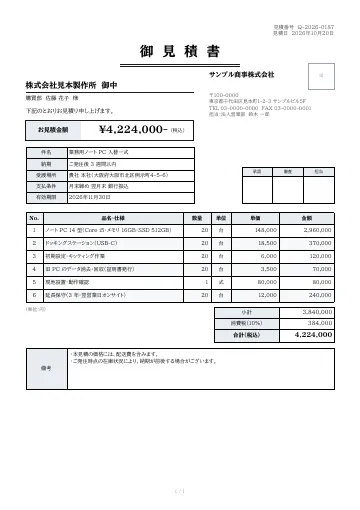
Quotation
A quotation with subject, delivery date, delivery location, payment terms and validity period, plus approval stamp boxes.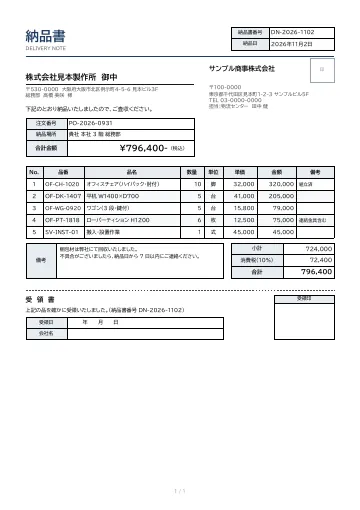
Delivery note
A delivery note with order number, delivery location, line items with product codes and remarks, totals, and a detachable acknowledgment of receipt.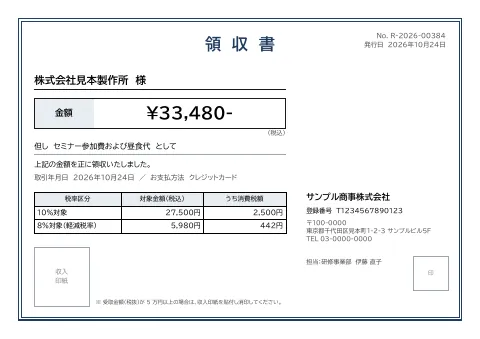
Receipt
An A5 landscape receipt with description, transaction date, amounts and consumption tax by rate, issuer registration number, and a box for a revenue stamp.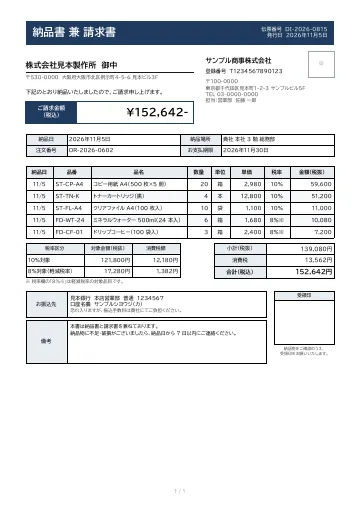
Delivery note and invoice
A combined delivery note and invoice with delivery date and location, payment due date, dated line items with tax rates, totals and consumption tax by rate, bank details, and a receipt stamp box.
Early access is open
We are preparing for launch. Pre-register and we will notify you when the service becomes available.