Fax cover sheet template
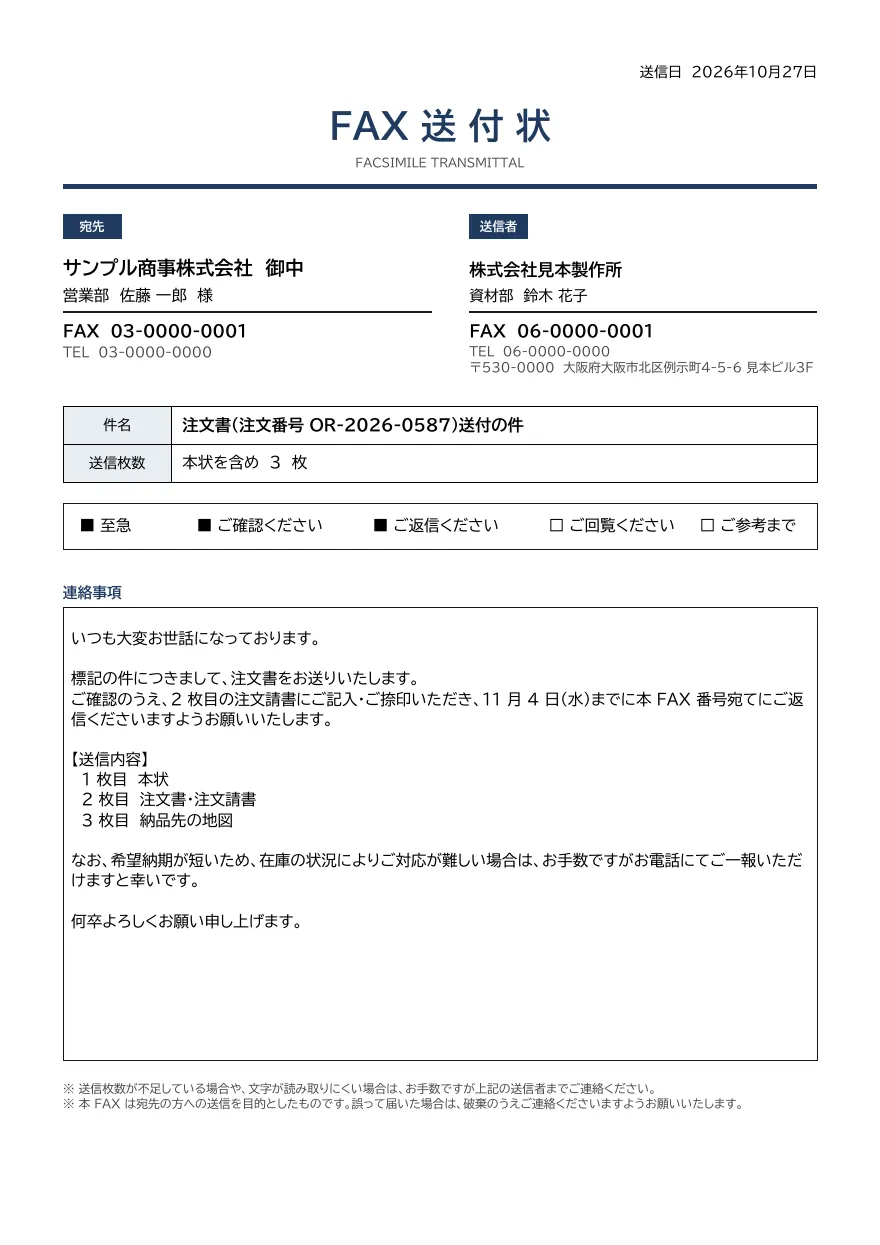
A fax cover sheet with recipient and sender fax and phone numbers, page count, subject, check boxes such as Urgent, Please confirm and Please reply, and a message area.
- Company names, people, addresses and amounts in the sample are fictional.
- The sample layout is in Japanese. You can change any text in the template editor.
Use cases
- First page when faxing order forms or quotations
- Creating PDFs for fax transmission from ordering systems
- Sending urgent documents that need a reply
Merge fields
The data fields you send to the API. Fields inside an array are shown as array.field.
| Field | Description |
|---|---|
sent_at | Date sent (YYYY-MM-DD) |
to.company | Recipient company |
to.department | Recipient department |
to.name | Recipient name |
to.fax | Recipient fax number |
to.tel | Recipient phone number |
from.company | Sender company |
from.department | Sender department |
from.name | Sender name |
from.fax | Sender fax number |
from.tel | Sender phone number |
from.postal_code | Sender postal code |
from.address | Sender address |
subject | Subject |
pages | Number of pages including this sheet |
check.urgent | Urgent (true or false) |
check.confirm | Please confirm (true or false) |
check.reply | Please reply (true or false) |
check.circulate | Please circulate (true or false) |
check.reference | For your reference (true or false) |
message | Message |
How to use it
- In the dashboard, choose Create template, select "Start from a template" and pick "Fax cover sheet". The layout and sample data are copied into your project.
- Edit the company name, logo and field positions in the template editor to match your own format.
- Send the template name and data to
POST /v1/rendersto issue a PDF.
With a test API key (sk_test_) you can issue documents from the draft. Publish a version before issuing with a production API key. From an AI assistant, specify the same template in the from of the MCP create_template tool.
Create and issue via the API
Create a template by setting from to the template ID (fax-cover) in POST /v1/templates, then send the template name and data to POST /v1/renders.
1. Create a template from the ready-made one
curl https://api.docrelay.jp/v1/templates \
  -H "Authorization: Bearer $DOCRELAY_API_KEY" \
  -H "Content-Type: application/json" \
  -d '{ "name": "Fax cover sheet", "from": "fax-cover" }'
2. Send data and issue a PDF
curl https://api.docrelay.jp/v1/renders \
  -H "Authorization: Bearer $DOCRELAY_API_KEY" \
  -H "Content-Type: application/json" \
  -d @fax-cover.json \
  -o fax-cover.pdf
fax-cover.json (sample data; arrays show the first item and long text is shortened)
{
  "template": "Fax cover sheet",
  "format": "pdf",
  "data": {
    "sent_at": "2026-10-27",
    "to": {
      "company": "サンプル商事株式会社",
      "department": "営業部",
      "name": "佐藤 一郎",
      "fax": "03-0000-0001",
      "tel": "03-0000-0000"
    },
    "from": {
      "company": "株式会社見本製作所",
      "department": "資材部",
      "name": "鈴木 花子",
      "fax": "06-0000-0001",
      "tel": "06-0000-0000",
      "postal_code": "530-0000",
      "address": "大阪府大阪市北区例示町4-5-6 見本ビル3F"
    },
    "subject": "注文書(注文番号 OR-2026-0587)送付の件",
    "pages": 3,
    "check": {
      "urgent": true,
      "confirm": true,
      "reply": true,
      "circulate": false,
      "reference": false
    },
    "message": "いつも大変お世話になっております。…"
  }
}More templates in Office & correspondence
Early access is open
We are preparing for launch. Pre-register and we will notify you when the service becomes available.