Shift schedule template
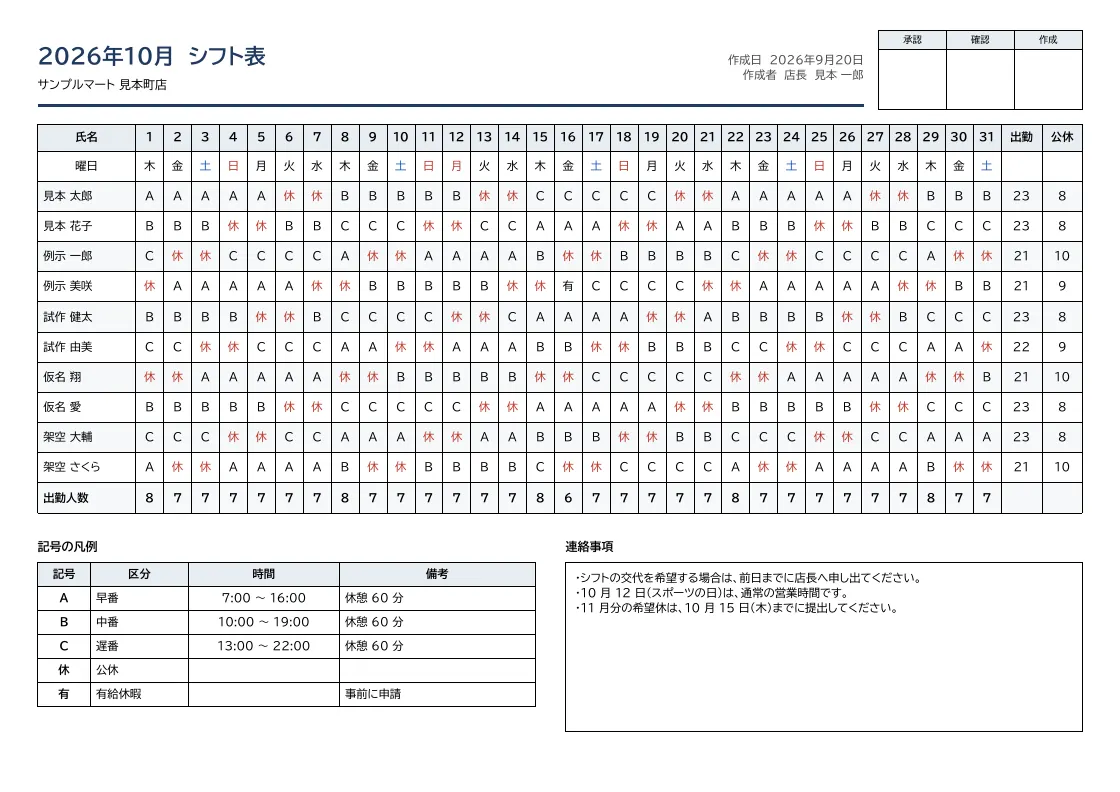
A monthly A4 landscape shift schedule with shift codes for each employee and day (1 to 31), rows for weekdays and headcount, workdays and days off per employee, a legend of codes, notes and approval stamps. Weekend and day-off codes can be colored.
- Company names, people, addresses and amounts in the sample are fictional.
- The sample layout is in Japanese. You can change any text in the template editor.
Use cases
- Monthly shifts for retail, restaurants and care facilities
- Printable PDFs from shift management systems
- Duty rosters for security and call centers
Merge fields
The data fields you send to the API. Fields inside an array are shown as array.field.
| Field | Description |
|---|---|
month | Month (e.g. 2026年10月) |
store | Store or site name |
created_at | Created on (YYYY-MM-DD) |
author | Prepared by |
staff | Employee rows (array; weekday and headcount rows use the same shape) |
staff.name | Employee name |
staff.d1 | Code for day 1 (text or colored segments) |
staff.d2 | Code for day 2 (text or colored segments) |
staff.d3 | Code for day 3 (text or colored segments) |
staff.d4 | Code for day 4 (text or colored segments) |
staff.d5 | Code for day 5 (text or colored segments) |
staff.d6 | Code for day 6 (text or colored segments) |
staff.d7 | Code for day 7 (text or colored segments) |
staff.d8 | Code for day 8 (text or colored segments) |
staff.d9 | Code for day 9 (text or colored segments) |
staff.d10 | Code for day 10 (text or colored segments) |
staff.d11 | Code for day 11 (text or colored segments) |
staff.d12 | Code for day 12 (text or colored segments) |
staff.d13 | Code for day 13 (text or colored segments) |
staff.d14 | Code for day 14 (text or colored segments) |
staff.d15 | Code for day 15 (text or colored segments) |
staff.d16 | Code for day 16 (text or colored segments) |
staff.d17 | Code for day 17 (text or colored segments) |
staff.d18 | Code for day 18 (text or colored segments) |
staff.d19 | Code for day 19 (text or colored segments) |
staff.d20 | Code for day 20 (text or colored segments) |
staff.d21 | Code for day 21 (text or colored segments) |
staff.d22 | Code for day 22 (text or colored segments) |
staff.d23 | Code for day 23 (text or colored segments) |
staff.d24 | Code for day 24 (text or colored segments) |
staff.d25 | Code for day 25 (text or colored segments) |
staff.d26 | Code for day 26 (text or colored segments) |
staff.d27 | Code for day 27 (text or colored segments) |
staff.d28 | Code for day 28 (text or colored segments) |
staff.d29 | Code for day 29 (text or colored segments) |
staff.d30 | Code for day 30 (text or colored segments) |
staff.d31 | Code for day 31 (text or colored segments) |
staff.work_days | Workdays |
staff.days_off | Days off |
legend | Legend (array) |
legend.code | Code |
legend.name | Shift type |
legend.time | Hours |
legend.note | Notes |
notes | Notes |
How to use it
- In the dashboard, choose Create template, select "Start from a template" and pick "Shift schedule". The layout and sample data are copied into your project.
- Edit the company name, logo and field positions in the template editor to match your own format.
- Send the template name and data to
POST /v1/rendersto issue a PDF.
With a test API key (sk_test_) you can issue documents from the draft. Publish a version before issuing with a production API key. From an AI assistant, specify the same template in the from of the MCP create_template tool.
Create and issue via the API
Create a template by setting from to the template ID (shift) in POST /v1/templates, then send the template name and data to POST /v1/renders.
curl https://api.docrelay.jp/v1/templates \
  -H "Authorization: Bearer $DOCRELAY_API_KEY" \
  -H "Content-Type: application/json" \
-d '{ "name": "Shift schedule", "from": "shift" }'curl https://api.docrelay.jp/v1/renders \
-H "Authorization: Bearer $DOCRELAY_API_KEY" \
-H "Content-Type: application/json" \
-d @shift.json \
-o shift.pdf{
"template": "Shift schedule",
"format": "pdf",
"data": {
"month": "2026年10月",
"store": "サンプルマート 見本町店",
"created_at": "2026-09-20",
"author": "店長 見本 一郎",
"staff": [
{
"name": "曜日",
"work_days": "",
"days_off": "",
"_align": "center",
"d1": "木",
"d2": "金",
"d3": [
{
"text": "土",
"color": "#1f5fbf"
}
],
"d4": [
{
"text": "日",
"color": "#c0392b"
}
],
"d5": "月",
"d6": "火",
"d7": "水",
"d8": "木",
"d9": "金",
"d10": [
{
"text": "土",
"color": "#1f5fbf"
}
],
"d11": [
{
"text": "日",
"color": "#c0392b"
}
],
"d12": [
{
"text": "月",
"color": "#c0392b"
}
],
"d13": "火",
"d14": "水",
"d15": "木",
"d16": "金",
"d17": [
{
"text": "土",
"color": "#1f5fbf"
}
],
"d18": [
{
"text": "日",
"color": "#c0392b"
}
],
"d19": "月",
"d20": "火",
"d21": "水",
"d22": "木",
"d23": "金",
"d24": [
{
"text": "土",
"color": "#1f5fbf"
}
],
"d25": [
{
"text": "日",
"color": "#c0392b"
}
],
"d26": "月",
"d27": "火",
"d28": "水",
"d29": "木",
"d30": "金",
"d31": [
{
"text": "土",
"color": "#1f5fbf"
}
]
}
],
"legend": [
{
"code": "A",
"name": "早番",
"time": "7:00 〜 16:00",
"note": "休憩 60 分"
}
],
"notes": "・シフトの交代を希望する場合は、前日までに店長へ申し出てください。…"
}
}More templates in HR & labor
Payslip
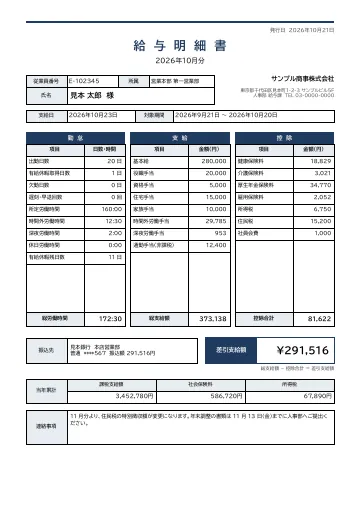
A payslip with employee number, department, name, pay date and pay period, three blocks for attendance, earnings and deductions, net pay, bank transfer details and year-to-date totals.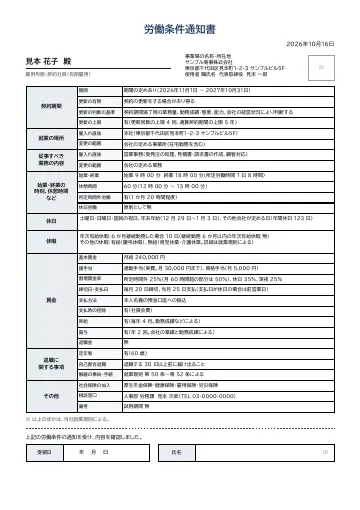
Notice of employment terms
A notice of employment terms with fields for contract period (renewal criteria and limits), place of work and duties (including scope of change), working hours and breaks, holidays, leave, wages and termination, plus a signature box for acknowledgment.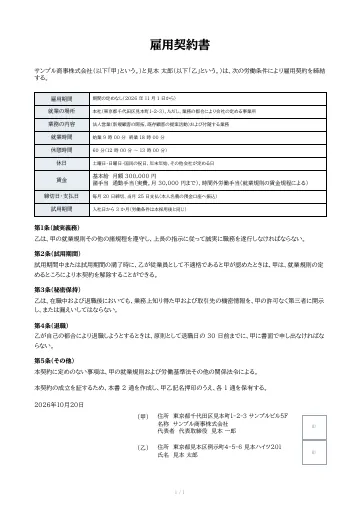
Employment contract
An employment contract between the company (Party A) and the employee (Party B), with fields for employment period, place of work, duties, working hours and wages, a body of clauses, and name and seal boxes for both parties.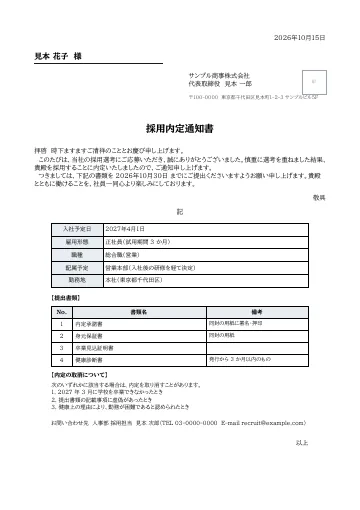
Job offer letter
A job offer letter with a formal Japanese body, fields for start date, employment type, position, department and workplace, a list of documents to submit, conditions for withdrawing the offer, and a contact.
Early access is open
We are preparing for launch. Pre-register and we will notify you when the service becomes available.