Certificate of completion template
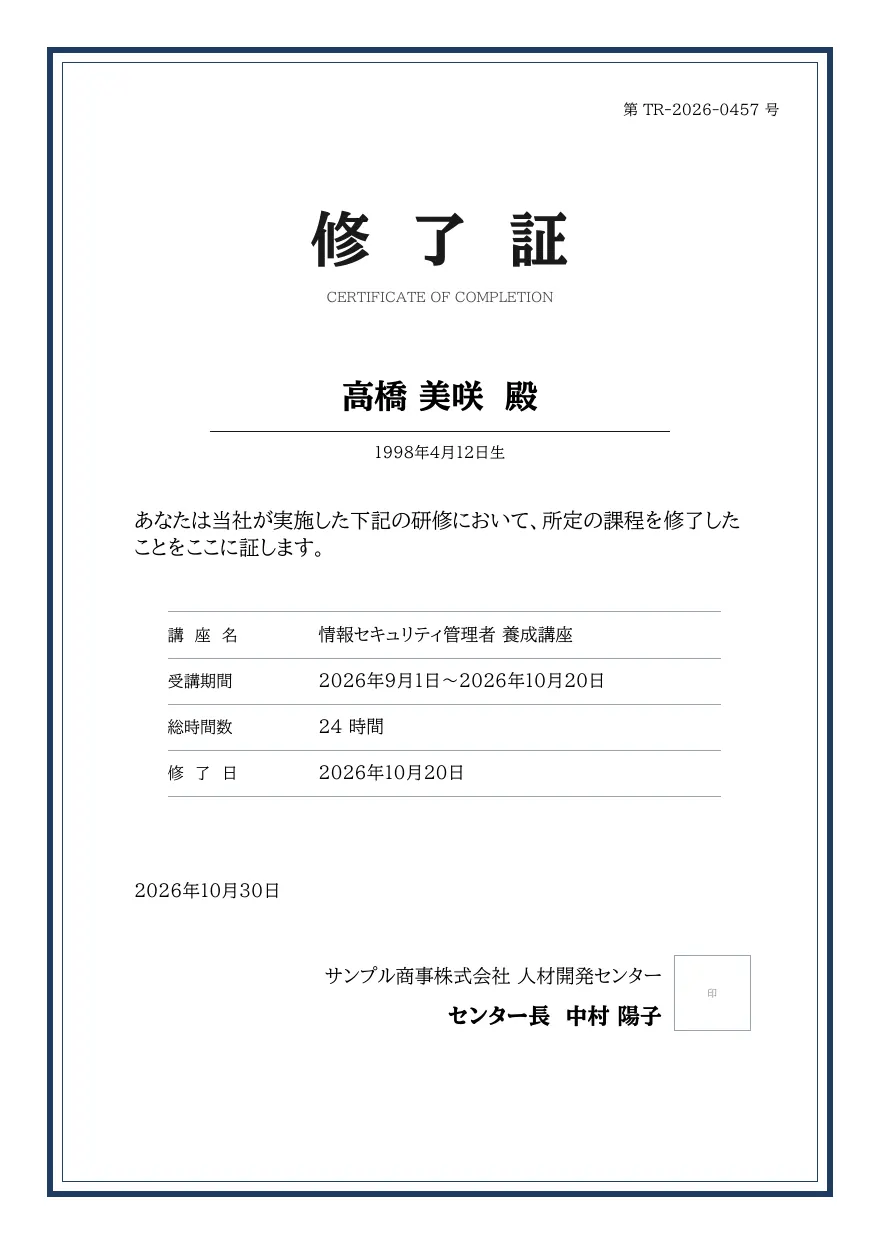
A certificate of completion with a decorative border, Mincho title, certificate number, recipient name and date of birth, course name, period, total hours and completion date, and the issuer with a seal box. Suited to bulk issuance for training participants.
- Company names, people, addresses and amounts in the sample are fictional.
- The sample layout is in Japanese. You can change any text in the template editor.
Use cases
- Certifying completion of in-house or onboarding training
- Bulk certificates for seminar and course participants
- Records of completed qualification or skills courses
Merge fields
The data fields you send to the API. Fields inside an array are shown as array.field.
| Field | Description |
|---|---|
number | Certificate number |
name | Recipient name |
birth_date | Recipient date of birth (YYYY-MM-DD) |
course.name | Course name |
course.from | Course start date (YYYY-MM-DD) |
course.to | Course end date (YYYY-MM-DD) |
course.hours | Total hours |
completed_at | Completion date (YYYY-MM-DD) |
issued_at | Issue date (YYYY-MM-DD) |
issuer.company | Issuing organization |
issuer.title | Issuer title |
issuer.name | Issuer name |
How to use it
- In the dashboard, choose Create template, select "Start from a template" and pick "Certificate of completion". The layout and sample data are copied into your project.
- Edit the company name, logo and field positions in the template editor to match your own format.
- Send the template name and data to
POST /v1/rendersto issue a PDF.
With a test API key (sk_test_) you can issue documents from the draft. Publish a version before issuing with a production API key. From an AI assistant, specify the same template in the from of the MCP create_template tool.
Create and issue via the API
Create a template by setting from to the template ID (certificate-completion) in POST /v1/templates, then send the template name and data to POST /v1/renders.
curl https://api.docrelay.jp/v1/templates \
  -H "Authorization: Bearer $DOCRELAY_API_KEY" \
  -H "Content-Type: application/json" \
-d '{ "name": "Certificate of completion", "from": "certificate-completion" }'curl https://api.docrelay.jp/v1/renders \
-H "Authorization: Bearer $DOCRELAY_API_KEY" \
-H "Content-Type: application/json" \
-d @certificate-completion.json \
-o certificate-completion.pdf{
"template": "Certificate of completion",
"format": "pdf",
"data": {
"number": "TR-2026-0457",
"name": "高橋 美咲",
"birth_date": "1998-04-12",
"course": {
"name": "情報セキュリティ管理者 養成講座",
"from": "2026-09-01",
"to": "2026-10-20",
"hours": 24
},
"completed_at": "2026-10-20",
"issued_at": "2026-10-30",
"issuer": {
"company": "サンプル商事株式会社 人材開発センター",
"title": "センター長",
"name": "中村 陽子"
}
}
}More templates in Certificates & awards
Early access is open
We are preparing for launch. Pre-register and we will notify you when the service becomes available.